Give saved products
a second chance.
Try image hearts, multiple lists and bulk cart actions. Explore requested alerts, reminders and product reports.
REAL WORDPRESS · FREE & PRO
Save products as a shopper. Explore setup and wishlist totals in Free, or inspect individual customer wishlists with Pro.
New interactive demo sessions run Free and Pro 0.5.9. Existing sessions keep their installed version until reset or expiry.
No signup · Up to 30 minutes · Nothing emailed externally
Opens your temporary store on plugins.shop. Prefer the store dashboard? ↓
CHOOSE AN EDITION AND A VIEW
Both views share your sample store. Free and Pro keep separate changes.
Try image hearts, multiple lists and bulk cart actions. Explore requested alerts, reminders and product reports.
One wishlist with many products, private notes, sharing and individual cart actions. Merchant inspection of customer lists is a Pro feature.
Shop as Alex, a fictional signed-in customer. Checkout, imports and external connections are disabled. Use fictional details only.
PRO · A REAL WORKFLOW, LOCAL DELIVERY
Follow the guide in your temporary store. The actual Pro plugin generates the message; it stays in your local demo inbox.
Try the restock demoIn this demo, inspect tests in the local inbox. On your own store, test delivery to yourself before enabling customer emails. Read the email setup guide →
A QUICK LOOK BEFORE YOU START
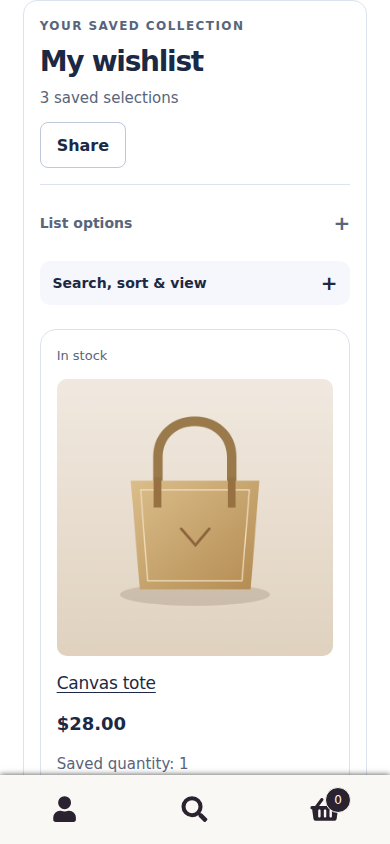
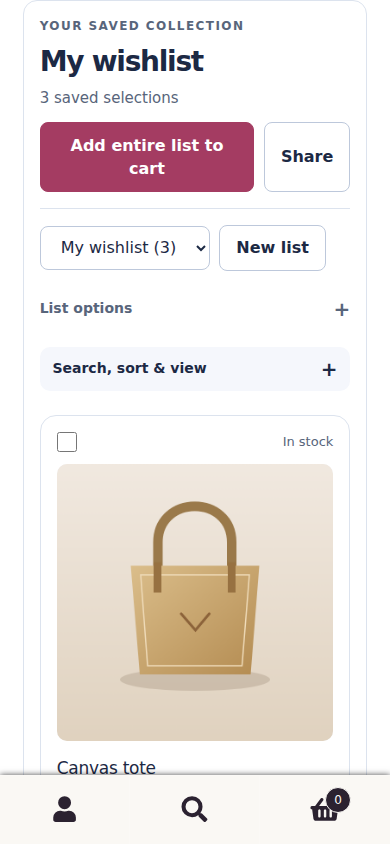
Genuine Free and Pro 0.5.8 captures with fictional products, on desktop and mobile. Version 0.5.9 keeps these interfaces and updates cart-display refresh behavior; the interactive demo version is stated above. Open either image to inspect it in full.
Saved products, private notes and a simple route back to the cart.
Multiple lists, editable quantities and whole-list cart actions.
BEFORE YOU START
A real temporary store. No real customer data needed.
Yes. These are the released plugins in WordPress and WooCommerce, with fictional products and report data. Free includes marked Pro previews. Pro uses a controlled fictional activation; no real licence or customer account is connected.
Yes. Shopper view and Store-owner view share your store. You shop as Alex, a fictional signed-in customer. Free and Pro keep separate stores; changes do not transfer between editions.
Messages and tests stay in the local inbox; nothing reaches your real email address. The shopper is signed in; the dashboard also offers a guest consent and confirmation preview. On your own store, guest additions and email changes need confirmation. Every customer choice is optional.
Checkout, payments, plugin installation, account administration, imports, real licence connections, updates and external integrations are disabled. The demo cannot prove delivery through your own email provider or compatibility with your theme and other plugins. Test those on a staging copy of your store.
Up to 30 minutes. Refreshing keeps your work. Use Your demos to continue, reset or end the store. End, reset or expiry removes its working data. A store keeps its installed version until reset or expiry.
The launcher shows preparation, capacity and expiry states with a retry or fresh-session action. Four stores can run at once, with up to two per browser and eight starts per hour per browser or network. If it is busy, view the screenshots or browse the guides and try later.
Use fictional details only. Essential cookies connect your stores; the owner cookie lasts up to 24 hours but does not extend a store’s lifetime. Security records have separate short retention periods. Read the demo privacy notice and website privacy information.
Start with Free, or add Pro for alerts, reminders and reports.
These actual 0.5.8 captures use an isolated fictional WordPress store. The interactive demo version is stated above. Your theme controls the surrounding store layout.